Cloud Adoption Guide
The resources you need to build and execute a successful adoption and change management plan
Atlassian’s guide to adoption and change management
In this guide, we’ll walk through best practices and tips for how to successfully roll out Atlassian cloud across your organization, at scale, so you can drive lasting change for how teams work and collaborate. The guide covers how to set your vision, assemble your core team, define success metrics, secure executive sponsorship, foster a community of power users, design a communications strategy, and build effective training and support.
Introduction
Why change management matters for your organization
Our customers rely on Atlassian to power mission-critical business processes. As they embrace digital transformation and agile ways of working, many move their toolsets to Atlassian Cloud to reduce overhead, reallocate infrastructure costs, accelerate productivity, and gain peace of mind with built-in security and compliance.
To recognize the full return on investment, you need your teams actively using Atlassian Cloud to power their daily work. Success depends on adoption, and adoption requires guiding people through change.
To get the most from your new cloud investment, your teams should build a consistent routine for how they utilize apps to align and work together. Atlassian Cloud provides that framework, giving teams repeatable best practices to collaborate, share knowledge, and execute at scale. Over time, these routines turn into habits that strengthen teamwork and drive lasting business impact.
That’s why building an effective change management plan is essential. From stakeholder buy-in to user training, a well-designed plan helps teams embrace new tools, migrate successfully, and realize long-term value from Atlassian Cloud. Let’s dive in.
Lasting change takes work
We get it – we’re all change-fatigued to some extent. Whether it’s a new tool or process we need to follow, it feels like something is always changing. It’s important to take this into account when building a plan to roll out any new change to any team – not just for changes in technology or software. To minimize the friction caused by change, it helps to have all the components moving in the same direction. That means the people, the processes, and the tools all need to work in harmony in order to make change effective and ensure it lasts.
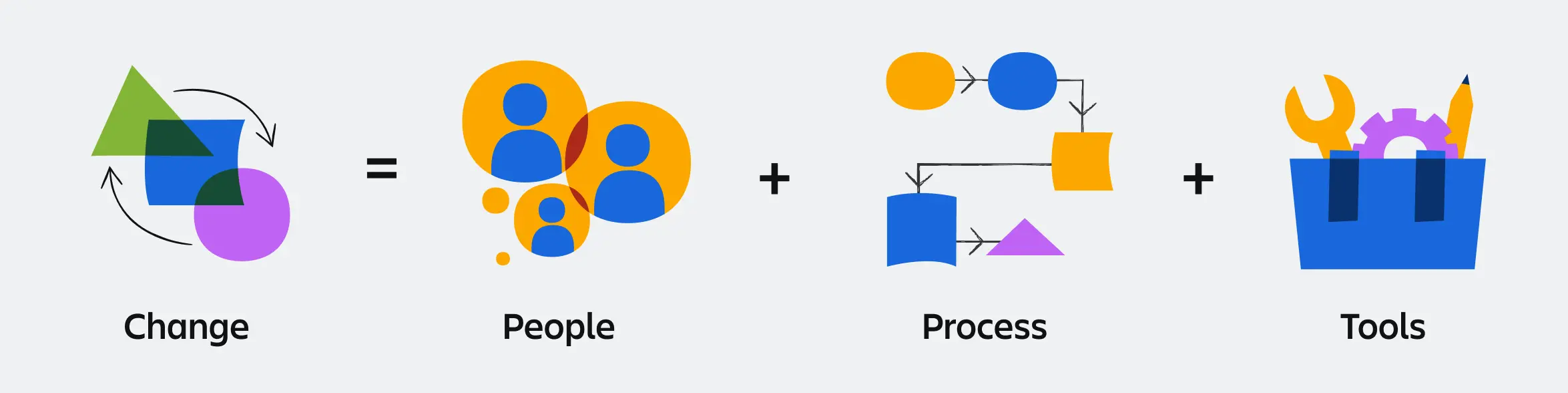
Ultimately, lasting adoption depends on how change is felt day to day. When users experience tangible benefits, like faster results, reduced manual work, and new possibilities unlocked, they are far more likely to embrace the shift. Strive to create an environment where your users genuinely want to engage with cloud tools because they make work easier and deliver stronger outcomes.
Benefits of a successful adoption and change management program
A strategic adoption and change management program delivers three critical outcomes:
1. Increase productivity
Proper change management with targeted training and support gets users operational from day one. Instead of hunting for login credentials or documentation, teams stay focused on business objectives that drive results.
2. Reduce shadow IT
By deploying Atlassian apps strategically, it ensures teams understand when and how to use each app for their specific needs. When technology requirements are met through proper training and feedback channels, teams won't seek unauthorized alternatives that create technical, billing, and security risks.
Pro Tip
Use automatic product discovery (available with Atlassian Guard or Cloud Enterprise) to identify unauthorized instances within your organization and consolidate them under official IT management.
3. Save time and money
A comprehensive migration plan with a thoughtful rollout reduces post-migration support tickets and prevents costly do-overs. Teams that don't adapt to changes often require expensive re-implementations.
Common barriers to successful adoption
Despite the above benefits, change rarely happens organically. The most frequent roadblocks include:
Inertia and resistance to new processes
Misaligned objectives between business and IT teams
Weak leadership sponsorship from key decision-makers
Timeline confusion around rollout phases
Unclear value proposition for end users
Tool overload without usage guidelines
Introducing a change management plan ensures teams understand what's changing, how, why, and when - plus provides the knowledge and resources needed for success. The remainder of this guide outlines proven steps to prepare for change and drive long-term adoption.
Pro Tip
Download our change management plan template to organize your digital transformation and apply the strategies covered in this guide. The change management plan template guides you through planning and executing your cloud migration while keeping all stakeholders informed and engaged.
How to build a rollout plan
After years of observing and advising customers as they adopt Atlassian apps, we’ve identified clear patterns of what works well and turned those patterns into a set of concrete steps.
FastShift
The FastShift program is complimentary and included with your purchase of cloud for licenses 1k and above, and while participation is entirely voluntary, it’s strongly encouraged. Based on your organization’s size and complexity, participation in the program can reduce your migration timeline by 2x-3x!
As a FastShift participant, you’ll be supported every step of the way by a dedicated team of migration experts working closely with Solution Partners and Advisory Services to provide high-touch program management, technical guidance, and change management support. This ensures a smooth transition and drives greater adoption across your organization
Step 1: Set your vision
Define a clear vision for your Atlassian portfolio to drive effective adoption. While streamlining workflows may be your primary goal, engage with teams during migration to discover additional use cases and benefits.
Define key messages
Identify core themes for user communications:
Organizational benefits and strategic value
Team and individual advantages
Usage guidelines and best practices
Important calls to action
Vision-setting questions
What are we trying to achieve with Atlassian Cloud?
Why are we making this change?
What specific benefits will adoption deliver?
Who will be impacted and how?
Create a Product Playbook
Document your IT application inventory and outline how Atlassian apps should (and should not) be used alongside existing software. This serves as the foundation for usage guidelines and deployment goals.
Product Playbook essentials
Company-wide and team-specific processes
Onboarding procedures for each product
Project naming guidelines by use case
Integration requirements with existing tools
Keep it current: Update your Product Playbook when supporting new use cases or onboarding new teams. Reference it regularly to keep users informed.
Pro Tip
Consider assembling your rollout team first, then collaborate on vision-setting. If team capacity is limited, draft the vision beforehand and use it as a baseline for input and buy-in from your rollout team.
Step 2: Define success
Establish what success looks like before rollout to ensure your adoption efforts stay focused and measurable. A strong measurement strategy helps you track progress, demonstrate value, and continuously improve.
Define success metrics
Identify what you’ll measure and why:
Clear success criteria for Atlassian apps
Measurable goals aligned with business priorities
Metrics that capture organizational, team, and individual value
User feedback mechanisms to track sentiment and needs
Supporting and improving
Build in ways to maintain momentum and adapt over time:
Accessible support channels for users
Regular sharing of success stories to highlight wins
Review processes to address challenges and uncover new use cases
Sample metrics to consider
CSAT: Gauge how satisfied teams are with the change
Active usage: Track how often and where tools are used
ROI: Track cost or time savings driven by adoption
Pro Tip
Align adoption metrics directly to your use cases. This ensures every data point connects back to how teams are working and the value they’re creating.
Step 3: Assemble your rollout team
A successful rollout is never a solo effort. Build a cross-functional team that can guide strategy, secure resources, and champion adoption across the organization.
Executive Sponsor(s)
Secure an active and visible executive sponsor. Their influence accelerates buy-in, clears roadblocks, and keeps adoption a business priority. Strong sponsorship ensures alignment, visibility, and momentum.Executive sponsor criteria:
Ability to influence senior leaders and secure resources
Authority over impacted groups and systems
Willingness to model and communicate change
Executive sponsor responsibilities:
Champion the vision and communicate its importance
Provide resources and remove roadblocks
Establish clear expectations for managers and teams
Listen to feedback across levels and address resistance constructively
If you’re struggling to identify an executive sponsor, start with the leaders who decided to adopt Atlassian Cloud, signed off on the investment, or hold final authority when issues are escalated. The right sponsor can champion change, influence peers, and commit resources when needed.
Project Owner
Assign a Directly Responsible Individual (DRI) such as a Project Manager, Change Manager, or IT lead. Their success is tied to the success of the rollout, making them accountable for driving execution.
Subject Matter Experts (SMEs)
Bring in both technical and business SMEs. Technical SMEs configure tools and guide training, while business SMEs provide team-level insights, surface challenges, and help tailor communications to real needs.
Coalition Building
Your rollout team should represent all stakeholders (executives, IT, SMEs, and business units). Together, they ensure the plan balances technical readiness with user adoption and creates a strong foundation for success.
Step 4: Scope the rollout
Your rollout strategy sets the tone for adoption. Whether you launch in phases or all at once, choose the approach that best fits your organization’s size, culture, and goals. A clear scope ensures teams know what to expect and builds confidence in the change. Create a high-level project plan to visually share critical milestones and communicate scope in a timeline framework.

Big bang rollout
Introduce Atlassian Cloud to your entire organization at once using a lift and shift approach. This works well for company-wide digital transformations or leadership-driven mandates, creating immediate alignment and momentum.
Phased rollout
Roll out by department or pilot group, applying lessons learned to each new phase. This approach allows for targeted support, reduces risk, and creates early success stories that build enthusiasm.
Prioritizing departments
If you choose a gradual rollout, begin with departments that collaborate closely. These users are generally using the same tools and can work together to normalize the new processes. This will help you prioritize use cases later on (detailed in Step 8). You might also want to consider teams or departments that have a reputation for being open to change, so you face less resistance at the start.
Regardless of which approach you choose, be sure to take into account the change formula:
Who is impacted? (People)
How will they be impacted? What will change? (Process)
What tools will be used? (Tools)
Pro Tip
Migrating 1,000+ users? Contact your account team about the FastShift program to take advantage of dedicated support from our team of experts, including Advisory Services and Solution Partners, to help accelerate your transition. If you have any questions about your migration approach, you can also contact Support.
Run steps 5-8 in parallel
Steps 5–8 work best when run in parallel, rather than sequentially, because these activities inform each other. For example, your Champions will help you understand what users need and which use cases matter most, which in turn will shape your communications and training plans. Running these steps at the same time creates tighter feedback loops and ensures every team gets the right comms, training, and support needed at the outset of your Atlassian Cloud launch.
Step 5: Identify Champions
Champions are critical components to a successful rollout. They play such a pivotal role in driving adoption that we’ve dedicated a separate chapter to this step. The short version is that Champions are enthusiastic teammates embedded within the teams where change is happening, so they are well-positioned to build trust, spread positive sentiment, and accelerate change. Identifying Champions across your organization ensures your message is amplified and adoption momentum is sustained.
Step 6: Build your communications plan
You’ve got a plan in place that’s been vetted by your rollout team. Now, how will you communicate the change to teams and foster positive sentiment toward it? Create a high-level communication plan to visually share the critical milestones and communication cadences.

How often should you communicate?
Repetition is key. It’s not realistic to expect a single announcement to reach everyone, so plan for multiple communications through different channels. Allow teams time to get comfortable with the change so they’re ready when rollout happens.
Who will the sender(s) be?
People are more likely to act on messages from leaders they trust. Enlist your Executive Sponsor (Step 3) and Champions (Step 5) to deliver updates. Their involvement boosts visibility and credibility.
Which channel(s) should you use?
Because you’ll be sending multiple communications, you’ll want to use a mix of channels to maximize reach:
Email and/or Loom from Executive Sponsor
Corporate intranet or newsletters
Slack, Teams, Zoom background, desktop screensaver
Town halls or team meetings
Physical signage or swag (posters, laptop stickers)
Announcements and/or banners on the Data Center Confluence home page, Jira home page, or in the Jira Service Management help center and portal.
When and what are you communicating?
While there is no perfect recipe for communications to users, we have created a framework you can leverage. This is just a recommendation, as the timing of each phase will be specific to your migration planning. You’ll likely have additional comms sent to subgroups, for example, when you are recruiting Champions or preparing your help desk team for an influx in support tickets around launch. We have templates for each of the emails outlined below that you can customize for your organization.
Migration
Phase | Assess | Plan | Prep | Test | Pre-launch/migrate |
|---|---|---|---|---|---|
Timing | 6-12 months prior to migration | 4-6 months prior to migration | 2-3 months prior to migration | 1-2 months prior to migration | 2 weeks before launch |
Email subject | We're planning to migrate to Atlassian Cloud! | Planning for Atlassian Cloud: What’s migrating, new feature highlights and training resources | Atlassian Cloud - Invitation to UAT | Atlassian Cloud UAT is now in session! | We’re rolling out Atlassian Cloud! |
Email purpose | Give users early notice of the migration project | Give users more information on migration scope, new features and training resources | Share expectations of UAT | Kickoff UAT and share important details | Remind users of pending Atlassian Cloud launch. Call to action - bookmark new URL(s), download mobile app(s) |
Adoption
Phase | Launch/Migrate | Post-launch | Post-launch | Post-launch | Post-launch |
|---|---|---|---|---|---|
Timing | Launch day | 1 week post launch | 2 weeks post launch | 1 month post launch | 6 weeks post launch |
Email subject | Start using Atlassian Cloud today | Thank you for your Atlassian Cloud migration support! | Tips & tricks for Atlassian Cloud | How are you liking Atlassian Cloud? | Announcing Atlassian product feature updates! |
Email purpose | Announce Atlassian Cloud migration is complete. Call to action - log in to site, bookmark URL(s), download mobile app(s) | Thank and acknowledge the teams that made the migration a success | Remind users how to login to new site. Share user training materials | Check in - request initial feedback | Share new features and other product updates |
Regardless of which channels you use to communicate, take the time to customize your comms so each team sees how Atlassian Cloud connects to their unique challenges and use cases (as identified in Step 8). For example, Marketing will want to learn how Jira can track campaign performance, while Legal might focus on contract review workflows in Jira Service Management. Be sure to highlight live training opportunities and other available resources.
Step 7: Build your training and support plan
Training ensures teams feel confident in Atlassian Cloud from day one. A thoughtful plan equips users with the necessary knowledge and establishes ongoing support channels that sustain adoption over time.
Create a Learning Hub
Give your users access to a centralized learning hub, which serves as a one-stop shop and a source of truth for everything they need to ensure a successful transition to Atlassian Cloud. The hub should have resources with a welcome message, links to learning resources, learning timelines, tip sheets, and FAQs. You can use the Jira, Confluence, and Jira Service Management migration hub templates for ideas on how to share key information.
Pro Tip
Take advantage of our in-app features like custom Jira Onboarding to showcase your hub!
Design training for all learners
Offer resources in multiple formats to match different learning styles, such as written guides, videos, and interactive demos. Focus on the tasks users perform most often, like creating Jira issues or editing Confluence pages, so training feels immediately relevant.
Create onboarding checklists
Provide a simple checklist for first-time users, covering both universal tasks (e.g., setting time zones) and configurations unique to your organization. Clear guidance reduces confusion and accelerates comfort with new cloud tools.You can also direct users to our on-demand Learning courses to highlight differences between Data Center and Cloud, making for a quick cloud transition to Jira, Confluence, and Jira Service Management.
Empower IT and Champions
Train your network of IT admins and Champions alongside end users. This ensures your support team is prepared to resolve issues quickly, while Champions can answer questions and share best practices within their teams.
Provide ongoing support
Set up Slack or Teams channels where users can ask questions and get quick answers. Encourage Champions to monitor these spaces, helping scale support beyond IT.
Pro Tip
Use this guide and your own custom FAQ document as a cloud app training foundation. The guide outlines important changes to cover before launch and can be used to probe questions asked by new users. Then, use your own FAQ as a living document to capture and address the frequently asked questions throughout the life of the app.
Step 8: User acceptance testing
Adoption succeeds when teams see real problems solved. Focus your rollout on use cases that matter most to each department, so users immediately connect Atlassian apps to their daily work.
Uncover challenges
To do this, you need to identify current challenges and determine how you can use Atlassian apps to help solve them. Work with business SMEs to identify pain points across teams. Ask where processes slow down, handoffs break, or work gets lost. These challenges are your best entry points for adoption.
Define use cases
Once you’ve scoped your rollout and prioritized which departments will implement first, you can then choose use cases by department. Again, work with your business SMEs to identify the right use cases, as they may look different in cloud or be entirely new.
Here’s an example of how you could identify which use cases you’d like to land in each department (or across the entire organization):
Department | Current Challenges | Use Cases |
|---|---|---|
Marketing | - Manage cross-functional collaboration during campaign creation and execution - Plan product launches and execute promotional campaigns - Track campaign performance and metrics | - Create team-specific service desks (ie email, design, web) to standardize work intake and service delivery (Jira Service Management) - Automate marketing workflows (Jira) - Track goals and OKRs and assign owners (Jira) |
HR | - Provide answers to common questions - Onboard new employees consistently - Ensure quality job postings across departments | - Create a knowledge base that centralizes HR policies and resources to enable self-service (Confluence) - Automate onboarding workflow to ensure a timely and consistent experience (Jira) - Write better job listings by leveraging a standard template (Confluence) |
Legal | - Manage the sharing of internal vs. external documentation in a secure and compliant way - Deliver consistent service to internal customers for contract reviews, etc. - Track progress of legal cases | - Share legal documentation with external parties (external collaboration) (Confluence) - Create a service desk for internal legal requests (Jira Service Management) - Track cases and updates (Confluence) |
Operations | - Design and scale internal processes - Manage visitors, deliveries | - Resolve customer issues (Jira Service Management) - Manage procurement requests (Jira Service Management) - Build a visitor management system (Jira Service Management) |
You may uncover more use cases than you can handle at once, so start small and prioritize which ones to tackle first. Prioritize by business impact and team readiness, then pilot with a willing group. Early wins create internal case studies and momentum for broader rollout.
Pro Tip
Don’t just replicate old workflows in the cloud. Use your migration as an opportunity to simplify, modernize, and explore new capabilities built into Atlassian Cloud.
Confirm readiness
Before expanding adoption, confirm that your rollout will support teams on day one. Defining a Minimum Viable Product (MVP) and running User Acceptance Testing (UAT) ensures your migration delivers stability and business continuity.
MVP outlines the essential functionality teams need to succeed immediately after launch. This should cover 70–80% of daily tasks, focusing on business-critical workflows and features. Once the MVP is defined and agreed upon, it will be used in UAT to determine what tests are performed.
UAT validates the MVP with real users before migration. UAT confirms that workflows, integrations, and key features perform as expected, giving teams confidence and surfacing improvements early.
Pro Tip
UAT pilot users should include Champions, power users, admins, and at least one rep from each key department. These users should provide comprehensive feedback, reduces surprises, and set a positive tone for adoption across the organization.
Step 9: Ship it!
You’ve completed Steps 1 through 8 and you’re ready to go - congratulations! With your plan complete and rollout team aligned, it’s time to launch. Announce the rollout confidently, highlight the benefits for teams and the organization, and point users toward training and support resources provided in the previous steps.
Step 10: Monitor & engage
With a successful launch complete, you must now ensure that adoption continues to grow and teams derive lasting value from Atlassian Cloud. Be sure to monitor feedback channels from Step 8 and check in on a regular basis on the following:
Were we successful? What are our success metrics telling us? Do we need to course-correct?
How are our teams feeling about the change?
Are teams asking for additional features, add-ons, or apps? Are there other training resources that would be helpful?
Are there successes in one department that can be highlighted and shared to keep up the momentum?
How can we take this to the next level? Is there a new use case we want to land org-wide? Are we ready for teams to start using another Atlassian app to help solve an ongoing challenge?
Pro Tip
To learn how your teams are feeling about the change, consider surveying your teams. You can access built in survey plugins in Atlassian Marketplace: Surveys for Jira, Surveys for JSM, and Surveys for Confluence. Or, use Google Forms, Survey Monkey, and other survey platforms. Here are a few questions you may consider including in your survey(s):
Which tools are you using on a day-to-day basis?
On a scale of 1-10, how comfortable are you with using [app]?
What are your primary use cases for using the [app]?
What is working well for your team today?
Are you responsible for training your team on how to use [app]?
Are you interested in getting more training & resources? If so, for which apps/features?
How to build, train, and nurture an internal Champions community
What is a Champions community?
A Champions community is one of the biggest secrets to a successful rollout. Your team of Champions will be a group of people from across your company who you can engage, train, and deploy to help teams adopt Atlassian Cloud. Champions are often power users, but at their core they are trusted colleagues who can guide others through change with credibility and confidence.
Why build one?
Champions act as force multipliers. Because they sit within the departments where change is happening, they are usually the first to use new tools and processes. They can highlight department-specific use cases, train peers, and build excitement. More importantly, they bring trust because teams are far more likely to listen to a familiar, friendly voice than to an outside directive.
Who can be a Champion?
Anyone in your company can step into the role, whether they are a new hire, manager, or executive. Champions do not have to start as experts, as long as they are willing to learn and are motivated to improve how their teams work. Power users often make great recruits, but passion and openness to change matter just as much.
Pro Tip
If your organization spans multiple teams, departments, or regions, make sure your Champions community reflects that diversity. The closer Champions are to end users, the stronger the connection and trust.
Benefits of being a Champion
When you ask people to take on this role, be sure to share what is in it for them:
Expand skills: Learn Atlassian Cloud apps in depth while sharpening leadership and communication.
Grow careers: Gain visibility by driving change at an organizational level.
Get hands-on with innovation: Experience new tools and features early, even outside traditional technical roles.
Role of a Champion
Champions do more than cheerlead. They actively help your rollout succeed by:
Testing changes, validating learning resources, and sharing user feedback.
Modeling the behavior you want to see by showing how new tools fit into daily work.
Training peers through drop-in training sessions or quick tips, easing the load on support teams.
Surfacing ongoing feedback (how change is going, how users are adjusting, ways to improve) and best practices to the adoption team.
Staying engaged long term so future changes have a ready network of advocates.
How to identify Champions
Great, you’re interested in building a Champions community! But how do you go about identifying the right people for the job? Start by looking for people who are already showing strong engagement.
Audit logs can help you spot power users who frequently log in and actively work across apps. From there, expand to other motivated colleagues even if they are not technical experts. Admins can view Audit logs for each individual app and for the entire organization.
To access Audit logs for individual apps, go to Settings > Troubleshooting and support > Audit log.

Pro Tip
Check out our support documentation to learn more about audit activities in Jira Cloud and Confluence Cloud.
To access organization-wide Audit logs which displays data across all Atlassian apps in a single view, go to admin.atlassian.com and then navigate to Insights > Audit log. There, you can search key in-app actions such as:
Logged in to account

Created a new site

Deleted a Confluence page

Note
In Atlassian Cloud, you can access organization-wide Audit logs with an active subscription to Atlassian Guard Standard, which is included with all Enterprise plans or can be bought separately. Tracking user-created activity with organization-wide Audit logs is exclusively available with Enterprise plans.
Pro Tip
If you are on a Premium plan or higher, use Confluence Analytics to highlight your most active Confluence contributors.
How to train Champions
Your Champions may be experts in Atlassian apps, or they may be new to cloud. Either way, consistent training ensures they are aligned and prepared to support others.
Adopt a “train the trainer” model. When Champions are trained not only in cloud apps and features, but also in how to teach, they listen with a dual perspective: how to apply knowledge themselves and how to share it with their teams.
Encourage your Champions to pursue Atlassian certifications for added credibility and career development. You can also test your end-user training programs with Champions first to ensure they are effective before scaling them to the wider organization.
Pro Tip
For more information, the ‘Success Champion’ track within the Atlassian Champion program is an initiative designed to empower customers who drive innovative ways of working and enhance team performance by effect.
How to nurture a Champions community
Your Champions community should be active well beyond the initial rollout. Keep them engaged, connected, and motivated with regular touchpoints:
Create a dedicated Slack or Teams channel for updates, feedback, and collaboration.
Host monthly office hours to exchange best practices and highlight wins.
Launch a company user group where Champions can run events and share adoption ideas.
Reward your Champions and recognize their hard work through shoutouts, leadership notes, or career opportunities so that they feel valued.
Our top adoption and change management best practices
Over the years, we’ve seen organizations of every size adopt Atlassian apps at scale. These best practices will help you ensure lasting, meaningful change in your own company.
1. Change = People + Process + Tools
Successful change always starts with people. Many initiatives struggle because they focus only on process or technology. Emphasize and articulate the benefits for individuals, teams and the organization to drive awareness and excitement. When employees see how the change makes their work easier, they are more likely to embrace it.
2. Adoption is an ongoing journey
Launching change communications is only the beginning. Real adoption takes time as people acknowledge, accept, and adapt. Reinforce your message with consistent updates and remember that technology evolves too. Keep users informed of new features and improvements so adoption continues to grow.
Pro Tip
If you already have a newsletter, intranet, or Slack/Teams channel, consider sharing monthly tips and tricks, new feature highlights, and training opportunities.
3. Meet users where they are
Show teams how new apps fit into their existing workflows. Be clear about what the new process or tool will replace, and connect adoption directly to their daily work. Empathy is key: when users see continuity rather than disruption, the change feels manageable.
Pro Tip
Demonstrate how Atlassian apps like Jira integrate with tools such as Slack. Integrations make transitions smoother and show users how Cloud enhances, rather than disrupts, their work. Learn more about integrations here.
4. Tone is set at the top
As you’re planning your rollout, enrolling senior executives and leaders to endorse the change can help with broader organizational acceptance of the change. In addition to your formal Executive Sponsor(s), consider having an additional set of senior leaders further endorse the change. It could be as simple as forwarding the announcement to their departments to show that they are on board and supportive. We also recommend hosting a training session specifically for senior leaders so they can learn how their teams will be impacted.
Leadership buy-in accelerates adoption. Alongside your Executive Sponsor, involve other senior leaders to endorse the change. Even simple gestures, such as forwarding rollout announcements or attending a training session, show their teams that this initiative matters. We also recommend hosting a dedicated leader training to help them understand both the tools and user’s perspective.
5. Build your Champions community early
Engage your Champions, at all levels, as early as possible. Their enthusiasm and credibility help seed adoption within departments before the broader rollout. A pilot program for Champions allows them to test tools first, onboard their peers, and provide valuable feedback that strengthens your wider launch. Champions will tell you if the messaging is working and where it can be improved, giving you the opportunity to course-correct and increase the success of your rollout.
6. Make it fun
If it’s appropriate, gamify adoption with lighthearted activities that build momentum and engagement.
Friendly competitions between departments on tool usage
A call for the most creative use case
Feature wins and use cases in a monthly newsletter
7. Show is better than tell
Demonstrations are always more effective than instructions alone. Build your training plan around showing users how tools work in real scenarios.
Host lunch-and-learn sessions where teams can try apps hands-on
Offer department-specific training aligned to real use cases (ideally led by Champions)
Record these sessions to reuse for onboarding new employees
8. Keep an open feedback loop
Your rollout is strongest when users feel heard. Define how feedback will be collected and acted on, whether through Champions, Slack or Teams channels, surveys, or your service desk. A good feedback loop helps you address concerns quickly, capture best practices, and track the business outcomes adoption is delivering. Resistance may occur, but you can address it directly with your communications that reiterate the reasons for the change, the enablement and support you will provide, and feedback channels available.
We’re here to help
Your success with Atlassian Cloud is our top priority. With your change management plan in place, you may want additional guidance or expert support. Here are resources to help you through rollout and beyond:
Additional support
Atlassian Community
Join community groups such as the Atlassian Migration Program, Enterprise group, Jira Cloud admins group, or Confluence Cloud admins group to connect with peers, share best practices, and get advice from others using Atlassian apps at scale.
Customer Success Manager (CSM)
CSMs focus on helping your teams succeed in Atlassian Cloud. They can support onboarding, drive adoption, and keep you informed on the latest updates. To find out if you have a CSM, please reach out to your Atlassian representative.
Advisory Services
Atlassian Advisory Services connect you with strategic, technical, and domain experts. They provide prescriptive guidance not only on adoption and change management, but also on solution design, technology strategy, and long-term sustainment. Please note that Advisory Services are a paid service offered across various plan types.
Cloud Specialized Partners
Our Cloud Specialized Partners specialize in system integrations, deployments, and upgrades. Located worldwide, they work directly with your teams to tailor Atlassian apps to your specific business needs and solve complex enterprise challenges.
Adoption & change management resources
Setting your users up for success in Atlassian Cloud apps
Unlock your team's full potential with the comprehensive 'Setting your users up for success in Atlassian Cloud' guide, which highlights how to access your site and what’s different from self-managed apps.
Change management plan template
Streamline any organizational change with the easy-to-use change management plan template, designed to be used alongside this guide.
Email templates for introducing Atlassian Cloud apps
Jumpstart your communications plan with email templates that help inform and engage teams throughout the cloud rollout.
Quick start guides for Atlassian apps
Help teams get up and running fast on Jira Cloud, Confluence Cloud, and Jira Service Management Cloud with these Quick Start guides for Atlassian apps, live training opportunities and other available resources.
Onboarding and training resource hub
Build an effective training program with curated resources from the onboarding and training resource hub, including guides and webinars for apps like Loom and Rovo.
Loom resources
Rovo resources